Life With AI, Episode 1: Neil Bhattacharya on Building an AI Agent for Weekly Reporting
Neil Bhattacharya, Head of Business Relationships, TMNZ (Tax Management NZ)

This is the first in a series where I ask people the same handful of questions about how AI actually shows up in their work, not the highlight reel, just what’s actually happening day to day.
My guest is Neil Bhattacharya, Head of Business Relationships at TMNZ (Tax Management NZ), New Zealand’s leading tax payment platform. Neil has over a decade of experience across financial services, market research and technology, including time at NielsenIQ before moving into TMNZ, where he’s worked his way from Client Services Manager through Head of Client Services to his current role leading B2B commercial strategy, partnerships and growth. Right now he’s also running the go to market rollout of TMNZ’s new customer experience, coordinating marketing, product, engineering and sales. Find him on LinkedIn.
In short: Neil built an AI agent that pulls together Jira updates, Confluence docs and meeting notes into a weekly project report, cutting five to six hours of manual pulling and formatting down to a quick read and edit. It didn’t work first time. It took three or four rebuilds, mostly fixing what context the agent was and wasn’t allowed to use. His read on where this goes next: less chatbot, more standing agents handling the admin, freeing up time for the parts of the job that actually need a person.
Tell me a bit about yourself and what you’re doing day to day right now.
I lead the B2B commercial function at TMNZ. My role covers commercial strategy, service design and business partnerships across our B2B customers. I also wear a few other hats, one of which is leading transformation initiatives across the business. Right now, for example, I’m running the go to market rollout of our new customer experience platform, which covers everything from migration to activation and adoption across our whole customer base.
Do you remember your first use of AI?
It was quite a while ago. I think it was ChatGPT, back in mid to late 2023. Like all of us, I was using it like a chatbot really. Unlike a Google search, it felt a bit intimidating, because I didn’t really know what to ask or what to get out of it. Almost like a magic lamp, but I didn’t know what to wish for. I remember using it to write emails, do some DIY troubleshooting, summarise docs, the usual. There was no training, no manual, so it was all self-learning. Then the whole image thing blew up, everyone doing Studio Ghibli versions of everything. A bit of fun. Then someone introduced me to Claude, back in mid to late 2024, and that’s really when I started exploring more serious use cases and thinking about what I could do differently with this thing.
Can you walk me through one specific example recently, maybe the last time you used it this week. What was the task?
I’ve been thinking a lot more about agentic use rather than just using it like a chatbot, so here’s a live one. I’m running a significant GTM rollout project, coordinating multiple workstreams across marketing, product, engineering and sales. Organised chaos wrangling, basically. My job is making sure everything’s aligned, the interdependencies are managed, things land at the right time, and stakeholders are kept up to date on progress.
For context, the tools we use are the Atlassian suite, mainly Jira for project management across multiple parallel projects, and Confluence for documentation and knowledge bases. I use Granola for meeting notes, and there are a lot of meetings in a week. Every week I need to put together a report on progress and risks for a meeting I chair, and pulling that together used to mean gathering information from ten different places.
So I’ve set up an AI agent driven loop, an automation with a weekly goal. It pulls status updates and changes across multiple Jira workstreams, checks Confluence for any new artefacts or context, pulls comments off the project tasks, and pulls in the meeting notes, because quite often things get discussed and surfaced in our weekly check-ins that never make it into the project tool itself. It checks the meeting notes against the project updates. One thing I’ve realised is that AI does a much better job verifying facts than it does drafting from scratch. Then a subagent consolidates all of that into a report, pitched at the right level for the audience: an executive summary, key decisions needed, progress, blockers, questions. It emails me when it’s ready. I don’t publish it straight away, I read it, check it, make some edits, and then it’s good to go.
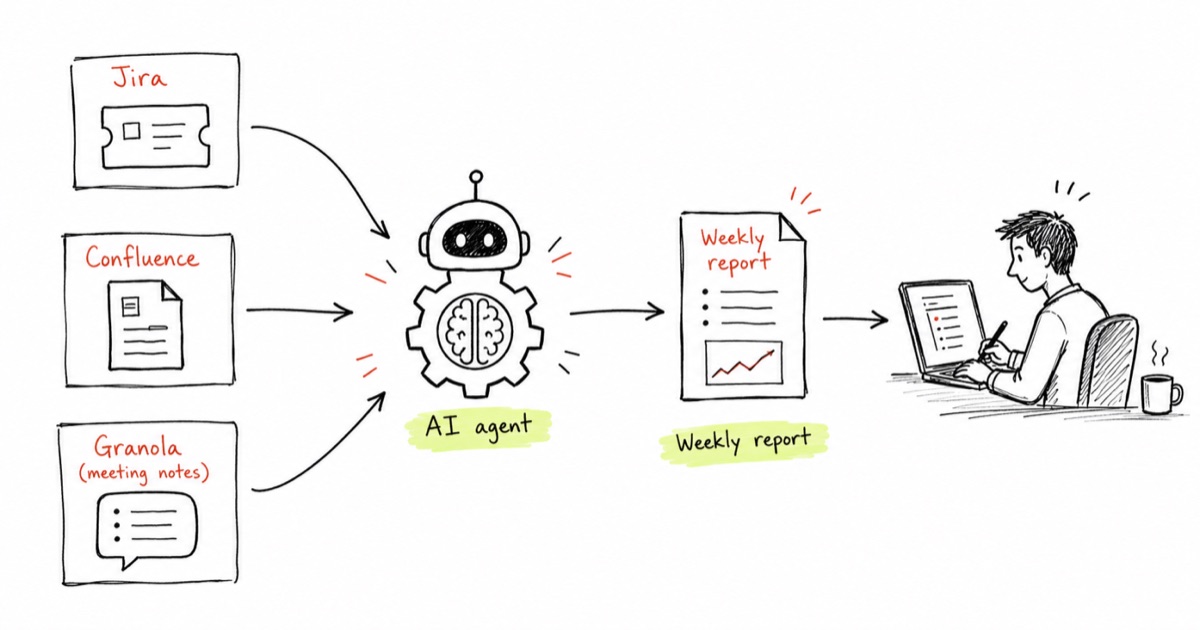
What format does it actually arrive in? Is it sitting in code, or does it build you a document?
It publishes as a Confluence page, which I can edit and finalise. I could have it produce a Word document too, since we’ve got document-making skills set up, but Confluence is what works for us.
You mentioned time saved and accuracy. Have you been able to put a number on it?
I’d estimate I was spending five to six hours a week on this before, mostly on pulling the data together and consolidating it into a format. That’s roughly what it’s saving me now, time I can put toward the more qualitative side, the actual discussions about what we need to do next.
Has there been a time it didn’t work?
It happens a lot, actually, and I think that’s where the misconception is. It’s not a magic bullet you turn on and it just works, because it doesn’t. You need to make sure it’s connected to the right data sets and tools, your MCP servers, and that it knows when to stop rather than going into a hallucinating loop. You have to give it that instruction.
With this exact example, I had to redo it three or four times to get it right. What was happening was it kept picking up context that wasn’t relevant. I’d saved a separate set of instructions in my personal profile, this is my role, this is what I do, this is where I work, and it was building on that and overriding what the actual task needed. So the right amount of context matters. Too much, or the wrong kind, doesn’t help.
I’ve also learned that if you’re not happy with a response, you have to give it feedback, otherwise it’ll keep doing the same thing. And it responds better to a score than to “this was good” or “this was bad.” If you tell it “your tone was four out of ten,” it understands that language and adjusts. I read about a term the other day, “botsitting,” for the work required to make AI usable: giving it the right context, checking outputs, debugging mistakes. Apparently people spend close to seven hours a week doing that. I had to do a fair bit of it to get this loop working properly. I’ve had fewer hallucination cases lately, but it helps to give it bite sized pieces of a task rather than overloading it, because then it just spins. Short answer, yes, it hasn’t always worked.
Where do you think this goes for you a year or two from now?
I keep reminding myself that we naturally default to using it like a chatbot, but there are other ways to use it. I’ve started using it more as a strategic thought partner, a way to test concepts, almost like a 24/7 sounding board, because it has infinite patience. I use it as a planning tool, in a planning conversation, without jumping straight to outputs: what can we do in this situation?
Looking ahead, I see myself leaning on it more like a mentor to get things done. From a technology point of view, I think it embeds itself further into day to day life, freeing up time for other things. I’ve already built something like an operational assistant that looks at my emails and creates a digest of what’s important, what hasn’t been replied to, what needs action.
That’s how I see it: different agents picking up pieces of your admin, building three or four employees for yourself who manage the heavy lifting and free you up. That matters more now because there’s so much information knowledge workers have to deal with, on top of life admin, and you end up wishing for more hours in the day, which you can’t influence. So I see it creating real personal helpers and agents that free up time you can put toward whatever adds value. Learning is a big one for me.
One more, for anyone who’s only ever poked at ChatGPT out of curiosity. What would you say to get them to actually try something?
If you ask when the best time to learn was, the answer is yesterday. If you ask the second best time, it’s today. You can’t keep up with everything, and trying to will just stress you out. I compare it to dollar cost averaging in investing: you put in a little every day, and over time, ups and downs included, you come out ahead. If people can put in twenty minutes a day just learning and trying things, that’s a good start.
Part of the problem is there isn’t much good training material out there, and what exists probably has a shelf life of about three months. So find some low hanging fruit use cases and experiment before you think bigger. One easy tip: instead of typing into a chatbot, talk to it. We often have ideas we’re thinking out loud, and the newer models handle unstructured thinking well, so you’re not filtering yourself before the idea’s even out. Talk to your AI models, brainstorm, see what comes up. Try things, listen to a podcast here and there once a week. It’s important to just go and try.
That's the same idea behind AI Operations: find the one admin task quietly costing you hours each week, like Neil's reporting pull, and design an agent around it properly.